Digital Signage for Manufacturing: Safety and Shift Communications
How to plan digital signage for manufacturing: safety messages, shift handovers, live KPI dashboards, alerts and screen placement on the factory floor.
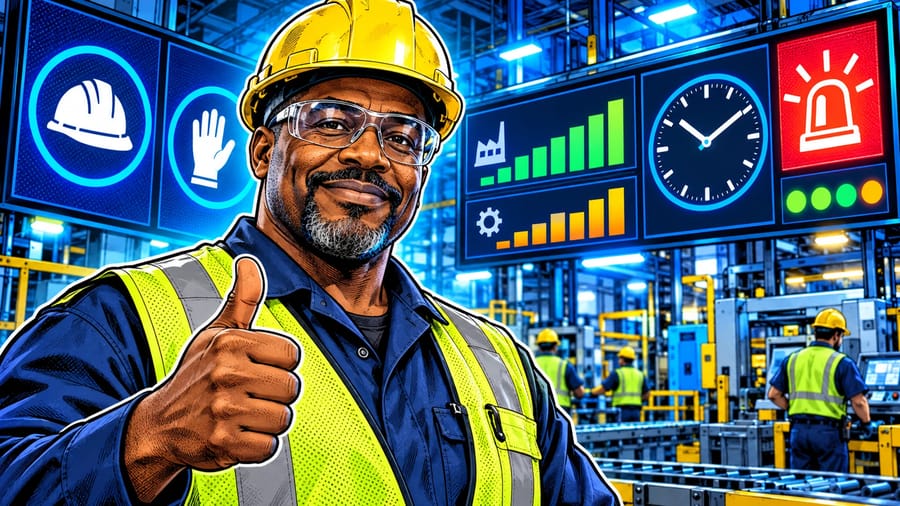
Digital signage for manufacturing puts the information people need while they work on screens they can see from the line: safety rules, shift targets, handover notes, live performance dashboards and urgent alerts. It reaches deskless workers who rarely check email, and it replaces printed notices that go out of date the day they are pinned up. This guide shows how to plan factory screens around two jobs that matter most, safety and shift communications: what to show, where to place screens, how to schedule content by shift, and how to keep messages current across one plant or several sites.
Why factories use screens for safety and shift communications
On a production floor, most people do not sit at a computer. Information still reaches them through team briefings, notice boards and word of mouth, and each of those has gaps: a briefing is missed, a notice is outdated, a message is passed on incorrectly.
Screens close those gaps. They show the same message to everyone in an area at the same time, they can change by shift without anyone reprinting a sheet, and an urgent update can reach every zone in minutes. Used well, screens make safety rules visible at the point of risk and make the state of the shift clear to everyone, not just the supervisor. For an overview of manufacturing use cases, see our page on manufacturing digital signage.
Safety messages that people actually notice
Safety content fails when it becomes wallpaper. The same slide every day stops being read within a week. Treat safety content as a rotating campaign instead.
PPE reminders at the point of use. Place a screen where people enter an area that requires gloves, hearing protection or eye protection, and show exactly what is needed there.
Days without incident. A visible counter, updated by the safety team, keeps attention on the shared goal. Keep it honest: reset it when an incident happens and explain what was learned.
Hazard of the week. Pick one topic each week, such as forklift traffic, lifting technique or lock-out procedures, and show a short visual explanation.
Near-miss learnings. Share anonymised lessons from recent near misses so the whole site learns, without naming individuals.
Emergency information. Assembly points, emergency contacts and evacuation routes should always be part of the loop near exits and break areas.
Keep each slide visual and short. Icons, photos of your own site and one line of text work better on a busy floor than a paragraph of rules. Have the safety manager approve every safety slide before it is published.
Shift communications from handover to break room
Every shift starts with questions: what are the targets, what changed since the last shift, which lines are down, who is covering. Screens can answer most of them before the briefing begins.
Shift targets. Planned output for the shift, by line or cell.
Handover notes. Key points from the previous shift, such as a machine running slow, a material shortage or a quality issue to watch.
Rosters and cover. Who is on which line, overtime opportunities and training sessions.
Changeovers and maintenance. Planned stops and when lines will restart.
Recognition and news. Milestones, safety awards, new starters and company updates belong in the break room, where people have time to read.
Scheduling is what makes this work. With digital signage software you can build a playlist for each shift and let it switch automatically at shift change, so night shift sees night-shift information without anyone touching the screen.
Live KPI dashboards on the floor
Production numbers are most useful when they are visible where the work happens. A screen at the end of a line can show output against target, current downtime, scrap or quality metrics, so the team can react during the shift rather than reading about it the next morning.
Pilosign supports live apps such as dashboards alongside your own slides, so a KPI view can sit in the same playlist as safety and shift messages. How the numbers reach that dashboard depends on your systems: many plants publish a web dashboard from their MES, ERP or a BI tool. If you are evaluating options, ask your vendor how a dashboard is displayed, how often it refreshes, and what the screen shows if the data source is unavailable.
Keep it readable. Show three or four numbers per screen, large enough to read from the aisle. Use colour sparingly, for example green when on target and amber when behind.
Mix it in. A dashboard does not have to be on screen all the time. Alternate it with safety and shift slides so both get attention.
Where to place screens in a plant
Placement decides whether screens are read. Walk the site with the people who will use them.
Entrances and turnstiles. Everyone passes here at the start of a shift: ideal for shift targets, safety campaigns and announcements.
Line ends and work cells. Live performance and handover information for the team working there.
Break rooms and canteens. Longer-form content: news, recognition, training and HR updates.
Hazard zones. PPE and safety rules specific to that area, at the point of entry.
Offices and meeting rooms. Site-wide dashboards and visitor welcome screens; for meeting spaces, see conference room displays.
Industrial environments are hard on equipment. Choose displays and mounts rated for dust, heat and vibration where needed, keep screens out of direct reach of forklifts, and use wired Ethernet where Wi-Fi is unreliable.
Players and hardware for the factory floor
Each screen needs a player that runs all day and recovers on its own after a power cut. Pilosign runs on dedicated players, Android TV and Amazon Fire TV. For screens in production areas, a dedicated player on a wired connection is usually the safer choice than a consumer streaming stick. The digital signage player guide compares the options, and the digital signage player page lists supported devices. Pairing is simple: open the app on the screen, enter the registration code it shows into your dashboard, and the screen appears in your account.
When you compare hardware, ask how a player behaves when the network drops and whether it keeps playing downloaded content, and check that it powers back on automatically after an outage.
Alerts and multi-site control
Some messages cannot wait for the next shift: a line stoppage, a weather warning, a site-wide safety alert. Plan in advance who is allowed to publish urgent messages and which screens they should reach.
With screen groups and one dashboard for every location, operations or HR teams can push an update to one zone, one plant or the whole network, while each site keeps its own targets and rosters. Write a short template for urgent messages now, so that when you need one it is clear, consistent and quick to publish.
A rollout plan for your first plant
Start small. Begin with two or three screens: one at the entrance, one in the break room and one at a key line.
Name owners. Safety, production and HR each own their content, with one person coordinating the playlist.
Build a weekly rhythm. Refresh the hazard of the week, update news, and check that schedules are still right.
Gather feedback. Ask operators what they read and what they ignore, then adjust. When the format works, add screens and sites.
For more ideas across sectors, see the buyer's guide to digital signage use cases by industry.
FAQ
What is digital signage for manufacturing? Screens on the factory floor, at entrances and in break rooms that show safety messages, shift information, live KPIs and alerts, managed centrally and updated remotely.
What should factory screens show first? Start with safety reminders and shift information: they matter every day and are the hardest to keep current on paper.
Can screens show live production data? Yes, if your data is available as a dashboard. Pilosign can display live apps such as dashboards; ask your vendor how your specific systems connect.
How do we stop safety content becoming wallpaper? Rotate topics weekly, use your own site photos, keep slides short and retire messages once they have run their course.
Can different shifts see different content? Yes. Schedule playlists by time of day so each shift sees its own targets and handover notes.
Bring your first factory screen online
Pick one area, plan a playlist for safety and shift communications, and schedule it by shift. Pilosign is free to use: connect your first screen, or talk to us about a pilot across several plants.